Honeycomb
Overview
Onehouse can export your deployment's metrics to Honeycomb, so you can query and alert on Onehouse telemetry alongside the rest of your services.
Metrics are sent over OTLP directly from your data plane to Honeycomb — they are not routed through Onehouse.
Before you start, read Forward Telemetry to Your Own Tools for the parts common to every exporter.
Before you begin
- Honeycomb must be enabled for your org, or it will not appear in the Vendor dropdown. Contact Onehouse (or your account team) to turn it on.
- Outbound network access to
api.honeycomb.io(orapi.eu1.honeycomb.ioon the EU instance) must be permitted from your data plane. If your VPC uses an egress firewall with domain or SNI filtering, add it to the allowlist — otherwise exports fail silently at the network layer.
Collect your Honeycomb values
1. Endpoint
Use the OTLP endpoint for your Honeycomb instance:
| Honeycomb instance | Endpoint |
|---|---|
| US (default) | https://api.honeycomb.io |
| EU | https://api.eu1.honeycomb.io |
Only these two hosts are accepted. A port is optional — the dialog's placeholder shows https://api.honeycomb.io:443, and omitting :443 works too.
2. API key
In Honeycomb, go to Environment settings ▸ API keys and create a key for the environment you want Onehouse metrics to land in. The key needs permission to send events.
Copy the key. Where it goes depends on your org's secret model: under BYOS, store it in your own secret manager and paste the reference into the exporter; under OMS, Onehouse manages it and no secret field appears. See where your credential is stored.
Honeycomb takes the API key exactly as issued — unlike Grafana Cloud, there is no encoding step.
Set up the exporter
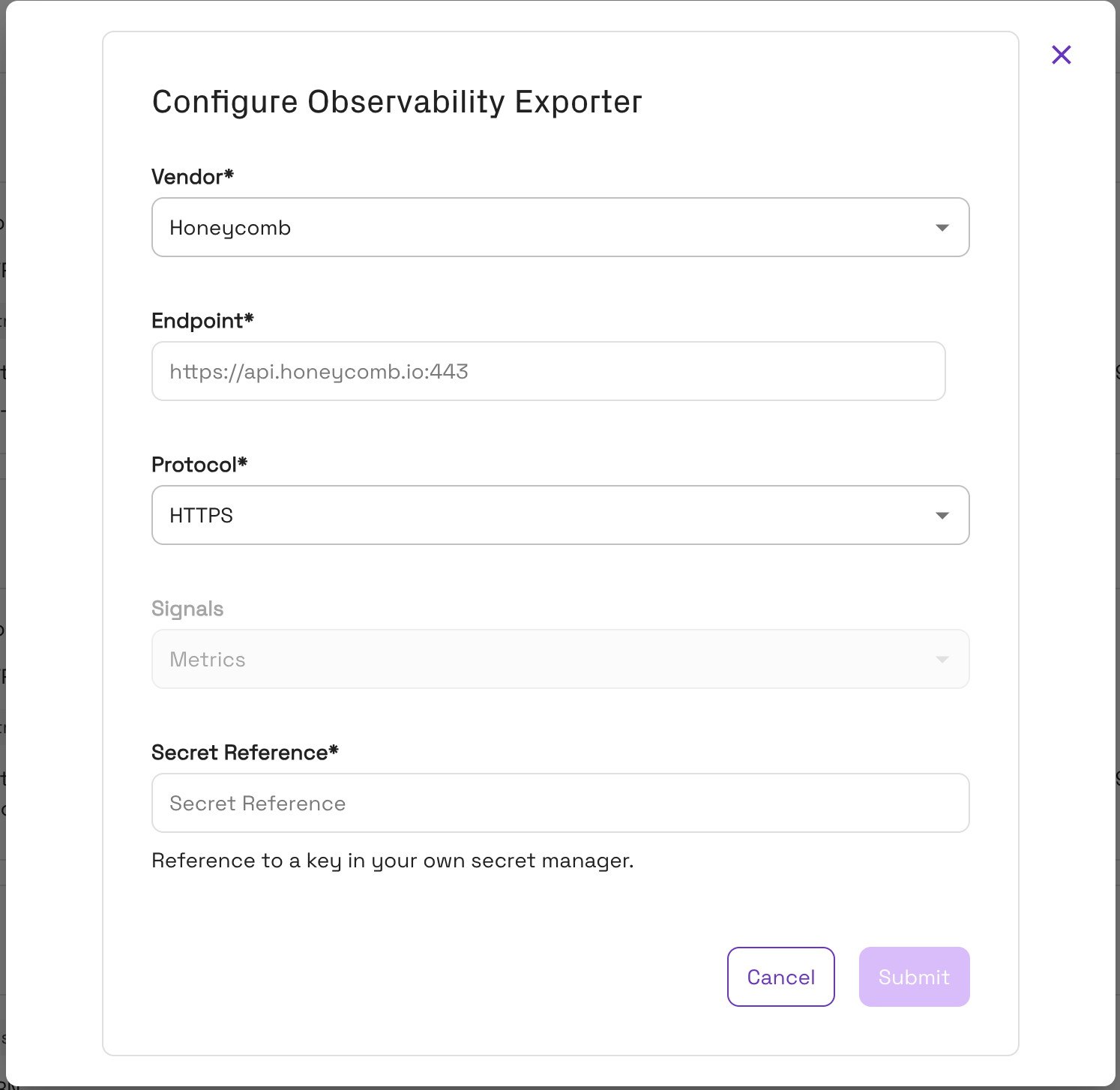
- Go to Settings ▸ Integrations, then Manage on the Observability card.
- Click Configure exporter and select Honeycomb as the Vendor.
- Set Endpoint to your Honeycomb OTLP host.
- Choose a Protocol — HTTPS or gRPC. HTTPS is the usual choice.
- Signals is greyed out at Metrics; Honeycomb receives metrics only, so there are no log level or log source fields.
- Under BYOS, paste your Secret Reference.
- Click Submit, then switch the exporter's toggle to Enabled.
Metrics begin flowing within a few minutes.
Where your metrics land
Onehouse sends metrics to a Honeycomb dataset named onehouse-dataset. The dataset is created on first write, so if you do not see it, no metrics have arrived yet.
The dataset name is fixed and not configurable in the console. To separate environments — staging from production, say — use a different Honeycomb environment for each, since the API key determines the environment.
Which metrics are exported
Honeycomb receives the same Onehouse metric set documented in the Datadog Metrics Reference — ingestion lag and sync timing, write stats, and compaction, clustering, and cleaner metrics, for both OneFlow (ohds_ prefix) and SQL cluster (ohsql_) workloads. Every metric carries table and database labels.
These are the same metrics behind the pre-built dashboards in Advanced Monitoring.
Troubleshooting
| Symptom | Likely cause |
|---|---|
| Endpoint rejected in the dialog | The host is not api.honeycomb.io or api.eu1.honeycomb.io. |
| Submit greyed out | A required field is empty — under BYOS that includes Secret Reference. |
| No metrics arrive, no console error | An invalid or revoked API key, a key from the wrong environment, or egress blocking api.honeycomb.io. All fail silently. |
The onehouse-dataset dataset does not exist | Nothing has been received yet. Confirm the exporter is Enabled and the key can send events. |
| Metrics arrive in an unexpected environment | The API key determines the environment. Issue the key from the environment you want. |
| Only some metrics appear | The metric's table service may not be enabled or has not yet run — see the notes in the Datadog Metrics Reference. |
Limitations
- Metrics only — Spark logs are not sent to Honeycomb. For log export, see Splunk Enterprise or Spark Log Forwarding.
- Fixed dataset — metrics always land in
onehouse-dataset. - Endpoint host is restricted to Honeycomb's US and EU OTLP hosts.