Spark Log Forwarding
Overview
Spark Log Forwarding archives your Apache Spark driver and executor logs to object storage in your own cloud account, giving you a durable, long-term record of every Job run.
The destination depends on the cloud your data plane runs in:
| Data plane | Destination | Console vendor |
|---|---|---|
| AWS | Amazon S3 | AWS S3 |
| Azure | Azure Blob Storage | Azure Blob Storage |
By default, Spark logs are available in the Onehouse console for 7 days after a Job run completes (see Monitor Job Runs). Spark Log Forwarding extends this to 30 days and delivers the logs into your own storage where you can query them directly — useful for troubleshooting incidents discovered weeks after a run. For retention beyond 30 days, see Retention and cost.
Key characteristics:
- Logs only. This integration forwards Spark logs. It does not forward metrics.
- Your account, no extra setup. Logs are written to storage in your own data plane using the cluster's existing cloud identity — its IAM node role on AWS, its managed identity on Azure. There is no cross-account access, no API key, and no secret to manage.
- Driver and executor logs, separated in the object layout so you can query each independently.
Enable Spark Log Forwarding
Spark Log Forwarding is enabled per project by the Onehouse team. Contact Onehouse (or your account team) to turn it on for your project. Once enabled, you can configure it in the console using the steps below.
- In the Onehouse console, go to Settings ▸ Integrations, then Manage on the Observability card.
- Click Configure exporter and select your destination as the Vendor:
- AWS
- Azure
Select AWS S3. It authenticates with your data plane's IAM role, so there is no endpoint, protocol, or secret to enter.
Select Azure Blob Storage. It authenticates with your data plane's managed identity, so there is no endpoint, protocol, or secret to enter.
- Set the configuration options described below.
- Click Submit, then switch the exporter's toggle to Enabled to start forwarding.
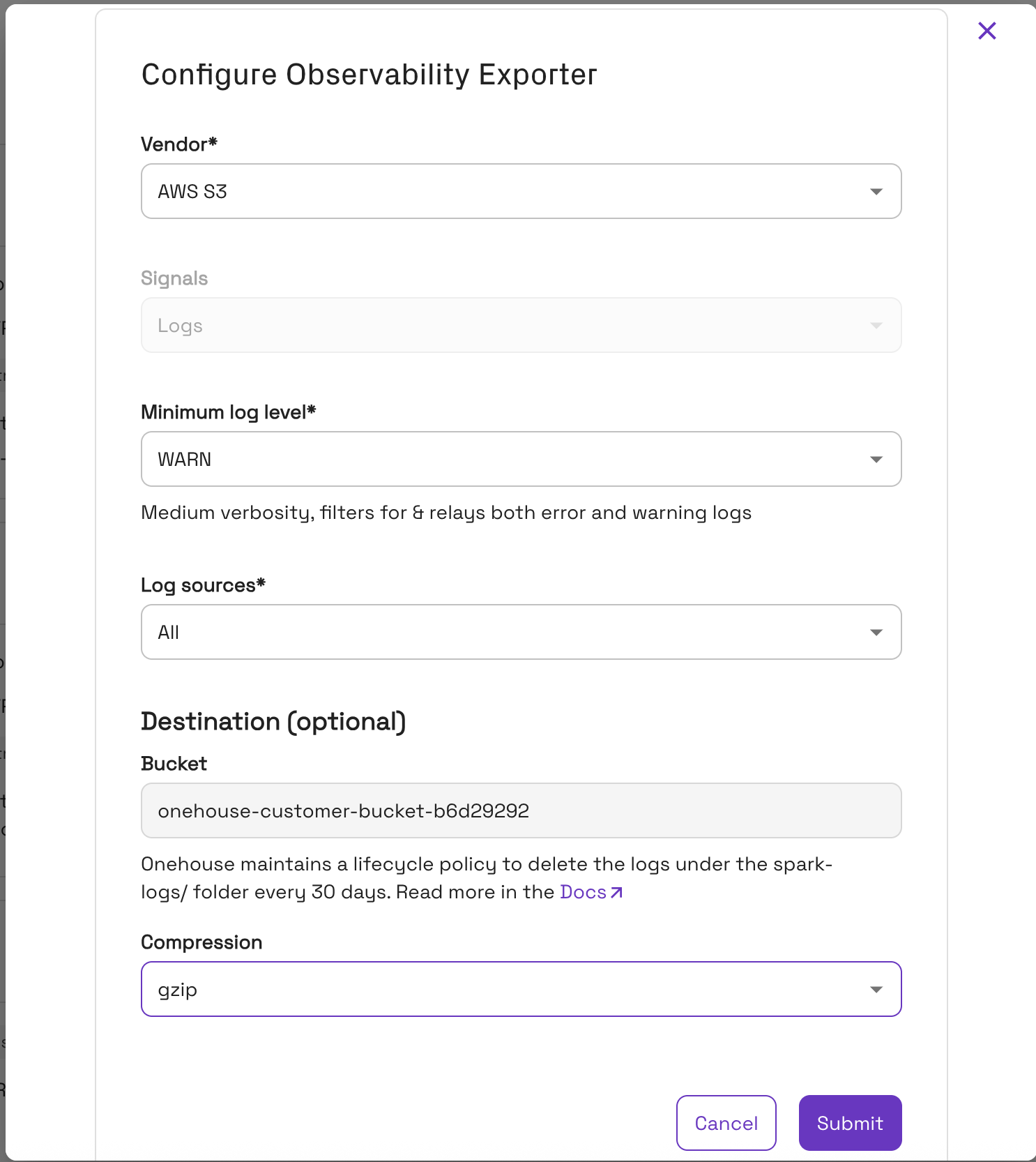
For the settings shared with every other destination — and how to pause or edit an exporter — see Forward Telemetry to Your Own Tools.
Configuration options
| Option | Values | Default | Notes |
|---|---|---|---|
| Signal | Logs | Logs | Fixed. Spark Log Forwarding handles logs only. |
| Min log level | ERROR, WARN, INFO | WARN | Minimum level for driver logs (executor logs are always forwarded at WARN and above — see the note below). Selecting INFO greatly increases driver log volume — and therefore storage cost — so the console shows a warning. |
| Log sources | Driver, Executor, All | All | Which Spark sources to forward. Driver and executor logs are always stored under separate prefixes regardless of this selection. |
| Destination | (read-only) | Your Onehouse customer storage | Fixed in the current version and not changeable in the console — see the tabs below for what it resolves to. |
| Compression | gzip, zstd, none | gzip | Compression applied to log objects. |
- AWS
- Azure
Logs are written to your project's S3 bucket onehouse-customer-bucket-<id>.
Logs are written to the onehouse-customer-bucket-<id> container in your project's storage1house<id> storage account.
The Min log level setting applies to driver logs. Executor logs are always forwarded at WARN and above, regardless of this setting. So selecting INFO adds INFO-level driver logs (and increases driver log volume and storage cost), but executor log volume is unchanged.
A custom destination and key prefix are not configurable in the console in this version; Onehouse applies sensible defaults. If you need a custom destination, contact Onehouse.
Where your logs land
Logs are written under a partitioned prefix:
- AWS
- Azure
s3://onehouse-customer-bucket-<id>/spark-logs/job=<job>/run=<run>/source=<driver|executor>/date=<YYYY-MM-DD>/
abfss://onehouse-customer-bucket-<id>@storage1house<id>.dfs.core.windows.net/spark-logs/job=<job>/run=<run>/source=<driver|executor>/date=<YYYY-MM-DD>/
In the Azure portal, browse to the storage account ▸ Storage browser ▸ Blob containers ▸ onehouse-customer-bucket-<id> ▸ spark-logs/.
Each part of the path identifies the logs it contains:
| Partition | What it is | Example |
|---|---|---|
job | The name of the Spark job (its scheduled-application name) — human-readable, not a UUID. It stays the same across every run of that job. | daily-ingest |
run | The unique identifier of a single run (the submission ID, a UUID). A new value is generated for each run. | 0f25bc4f-8a1c-4e2b-9f3d-1a2b3c4d5e6f |
source | Which Spark process produced the logs: driver, executor, or unknown. | driver |
date | The UTC date the log object was written (YYYY-MM-DD). | 2026-07-20 |
Example
Driver logs from a run of the job daily-ingest on 20 Jul 2026 land under:
- AWS
- Azure
s3://onehouse-customer-bucket-ab12cd34/spark-logs/job=daily-ingest/run=0f25bc4f-8a1c-4e2b-9f3d-1a2b3c4d5e6f/source=driver/date=2026-07-20/
abfss://onehouse-customer-bucket-ab12cd34@storage1houseab12cd34.dfs.core.windows.net/spark-logs/job=daily-ingest/run=0f25bc4f-8a1c-4e2b-9f3d-1a2b3c4d5e6f/source=driver/date=2026-07-20/
- Objects within each prefix are gzip-compressed, newline-delimited JSON (ndjson) — a new object per batch.
- The
job,run, andsourcepartitions keep each job's runs — and each run's driver vs. executor logs — isolated. - This layout is directly queryable: with Amazon Athena, AWS Glue, or Apache Spark on AWS; with Azure Synapse, Databricks, or Apache Spark on Azure.
Look up a log location
Instead of assembling the path yourself, read it back from the API:
| Command | Field | What it points to |
|---|---|---|
DESCRIBE JOB_RUN | sparkLogsPath | The directory for that single run, covering both log sources |
DESCRIBE JOB | sparkLogsBasePath | The parent directory covering every run of the Job |
Both fields return the URI form for your data plane's cloud (s3:// on AWS, abfss:// on Azure), and an empty string while Spark Log Forwarding is off. Onehouse records a run's path when you submit it, so DESCRIBE JOB stays empty until the Job's first run.
Delivery timing
Logs reach object storage in near-real-time — expect a short lag, not a live stream. Delivery is batch-based: an object is written when a batch reaches a size threshold or a set time window elapses, whichever comes first — that batching is what introduces the lag. The window is at most a few minutes, but in practice logs usually land sooner than that, and the final logs of a run appear shortly after it finishes.
Retention and cost
Onehouse automatically deletes forwarded logs after 30 days — objects under spark-logs/ are expired 30 days after they are written — so storage cost stays bounded with no action on your part.
The lifecycle policy on your Onehouse customer storage is managed by Onehouse, so editing those rules directly is not recommended: Onehouse's configuration takes precedence and overwrites manual changes on the next update. Expiry is evaluated by your cloud provider roughly once a day, so objects may persist a little past the 30-day mark before deletion. If you need to keep Spark logs longer than 30 days — for example, for audit or compliance — copy them to storage you manage, or contact Onehouse to discuss a longer retention window.
Limitations
- Logs only — metrics are not forwarded through this integration.
- Single destination — logs are written to your Onehouse customer storage; a custom bucket or container, and a custom key prefix, are not configurable in the console in this version.
- Fixed 30-day retention — Onehouse manages the storage lifecycle and deletes
spark-logs/objects after 30 days; retention is not configurable in the console (contact Onehouse for a longer window). - Log lines that cannot be attributed to a driver or executor are stored under a
source=unknownprefix.